

This blog post again belongs to topic I spoke about back in Zabbix Summit 2025 -- how do I monitor my nearby environment with Zabbix and how it can help planning my day.
You probably know how annoying it would be to go to train station, only to find out that your train has been cancelled, badly delayed or that you just missed the train for some reason. Zabbix to the rescue!
Let's monitor if
- my train is on time
- if it is not, how badly it is delayed
- or worse, if the train is cancelled
And more. But how do we even start?
Train info is open data
In Finland, we have tons and tons of official open data available, both APIs and datasets. No matter if you need data about traffic, weather, nature, population, you have it.
One of the places is Digitraffic, which contains way too many details about trains (among other things).
For my purposes, I only wanted to get some data about the train(s) I care about. For that, here's the query I came up with:
https://rata.digitraffic.fi/api/v1/live-trains/station/MLA?minutes_befo…
Adding that to Zabbix
Like so many times before, the story begins with a new template, which contains a HTTP Agent item acting as a master item.
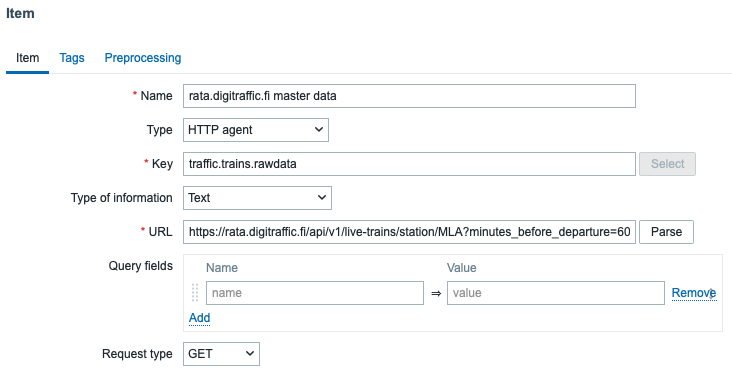
Then there's bunch of dependent items, parsing interesting pieces from the JSON response.

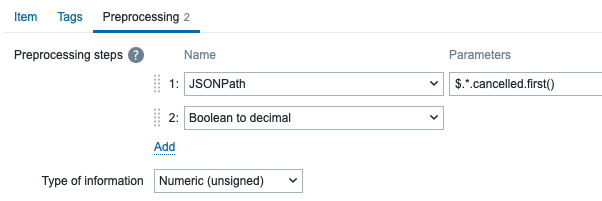
Each of the items then does relevant preprocessing, such as in the case if the train is cancelled or not. Note that it also converts a boolean to decimal so I can keep track of the status in numeric format.
Dashboard time
Finally, with all the items added, it is of course easier to spy the results through a dashboard. Here we go -- this is part of my unified single pane of glass dashboard providing me info about many details related to my day and life.

Those of you who might be new to Zabbix might be wondering how I created those "Difference to scheduled time" kind of widgets. For that, I used a very simple Calculated item:
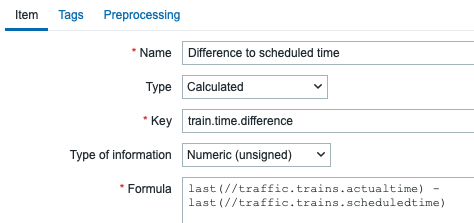
Formula in plain text: last(//traffic.trains.actualtime) - last(//traffic.trains.scheduledtime)
To complete this, I could add alerting if a train is badly delayed or cancelled -- but this particular blog post is more proof-of-concept, as in reality I don't need to travel with train very often. :D
