
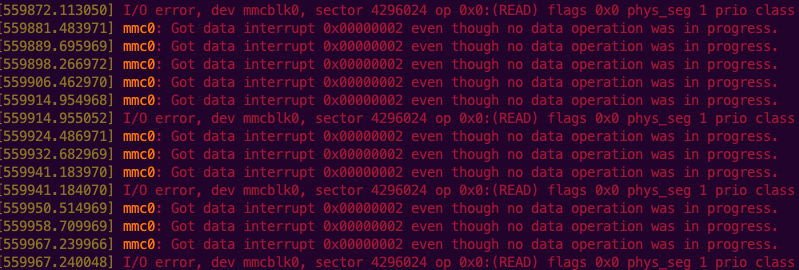
Now almost a year ago I blogged about my nine months of experience with running Zabbix on Raspberry Pi 4. I guess it's time to revisit that a bit, as the probably soon-to-fail memory card that came with Raspberry is causing all kinds of issues, even though everything important like Zabbix database is stored on external USB drive.
The filesystem layout
My Raspberry Pi is still booting from the memory card that came with it. However, I have moved much of the stuff to external USB drive I have connected to Raspberry:
- Logs
- MySQL for Raspberry
- Grafana datafiles
- Debian apt repository info
- Home Assistant Docker iamge
Operating system itself is still contained on memory card, and, well, things sure look interesting now.
Can you spot the time of failure?
I'm pretty sure I don't have to tell you when the memory card started to throw I/O errors. Yes, I have also power-cycled my Raspberry Pi 4, hoping it would make things work again. That did not help. I did not yet try to reseat the memory card, I'll just order a new one.
But wow, over 15 SECONDS of I/O request waiting time.


How does this affect the every day life of my Raspberry?
So far, it's just that trying to use the thing interactively can be painful. With that, I mean ssh sessions. Even the simple commands like uptime can take several seconds to run.
❯ time uptime
19:50:30 up 6 days, 11:18, 6 users, load average: 7.46, 6.30, 5.84
uptime 0.00s user 0.01s system 0% cpu 8.213 total
That took over eight seconds! Other than that, the server load remains constantly high, and occasionally my Zabbix complains that Docker -- so basically my Home Assistant instance -- is not responding, with soon enough it getting back to business. I know, I know, this is the perfect example of alert noise that was one of the speeches at Zabbix Summit 2023, but I also know that this disturbance in the force will be temporary.

Other than that, everything keeps on working. I think it's a testament to stability of Linux and Zabbix that Zabbix still can gather data and keep its server & user interface working, albeit the latter working slower than usually.
