

Zabbix 7.0rc2 was released few days ago, and one of the most striking additions to it is the pre-built template for the new Selenium-based website monitoring. Of course I had to try it out.
Wait, new website monitoring?
Yep, Zabbix 7.0 comes with new Browser item type. It allows you to test any website by using Selenium, and it can even take & store screenshots to new Binary item type. Zabbix 7.0 does not bundle Selenium for you, but getting Selenium up and running is easy, just follow the instructions for your operating system.
Selenium runs a headless instance of Google Chrome, Firefox, or any other web browser, so your site gets tested exactly as the end-users would see it. This is fantastic, especially with the addition of the screenshots -- you'll get to see how your site did look like when some error situation happened.
Setting up Zabbix for Selenium
After you have your Selenium server up and running, connecting Zabbix to it is a breeze. Just add these two lines to your Zabbix server configuration file.
WebDriverURL=http://your.selenium.server:4444
StartBrowserPollers=1
... the lines are self-explanatory, but the WebDriverURL is the URL for your Selenium server and StartBrowserPollers tells how many simultaneous site checks could be going on.
Download the template
In case you upgraded your Zabbix to 7.0rc2 from some older version instead of fresh install, download the new Browser template from official Zabbix templates.
Setup your first new site check
In my case, I just added the new template for this blog site, I have a host whatsuphome.fi for it.

Next, went to that host macros, and changed the address:

.... and that's really it to get started!
How does the default Selenium dashboard look like?
Here's how the default Selenium dashboard that's coming with the new template looks like.

You'll get to see how long it took to load the page resources, how long it took for TLS handshakes, DNS lookups, many other metrics. And, you'll get to see the screenshots in a very intuitive way, much like a film roll.

This is great!
Under the hood
Under the hood, the new Browser item is very configurable. For its general parameters, it's much like any other Zabbix item type.
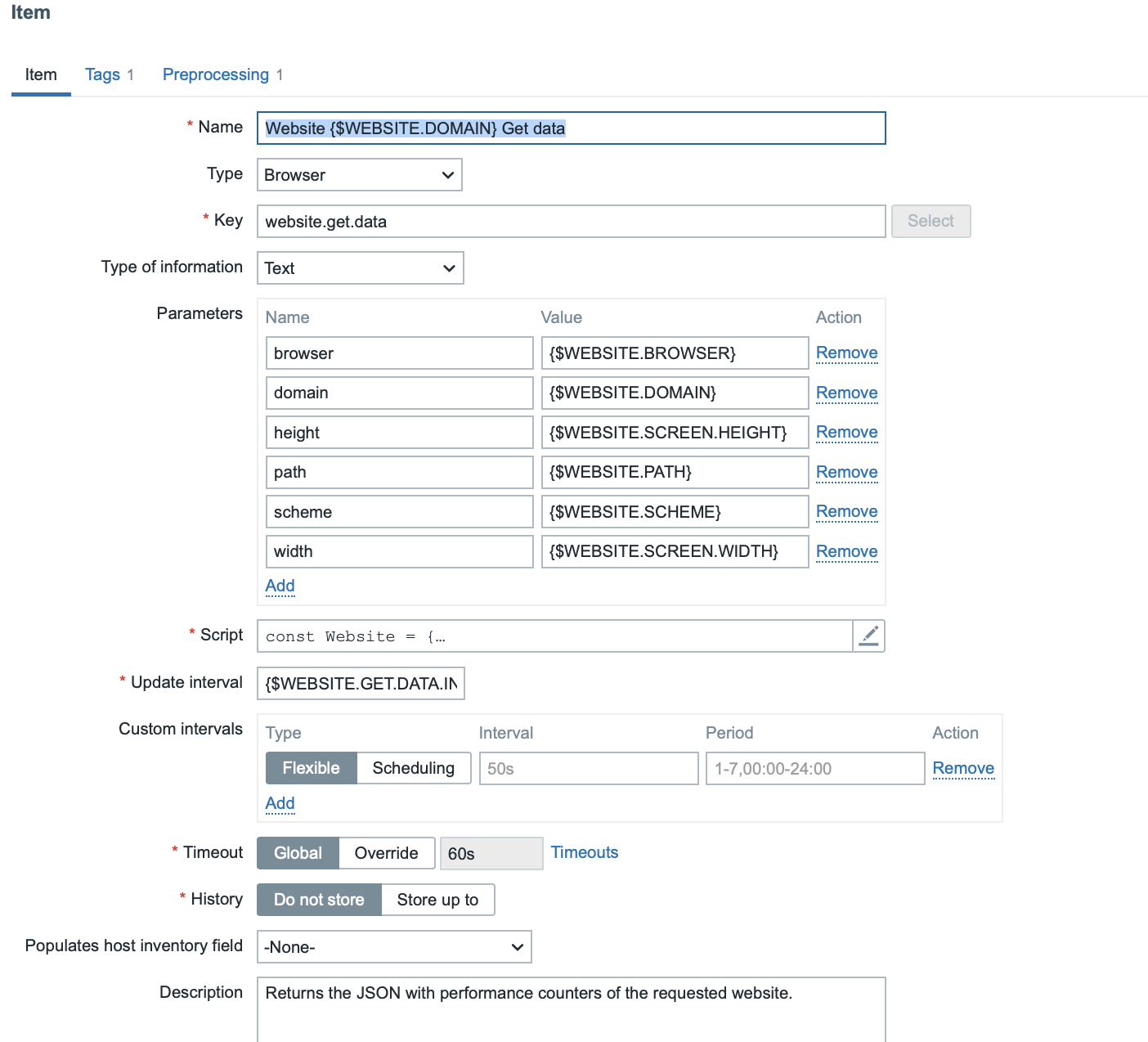
And if you look at the Script, you'll see that the default example script that's coming with template is actually very simple and easy to extend to your needs.
const Website = {
   params: {},
   setParams(params) {
       ['scheme', 'domain','width', 'height'].forEach(function (field) {
           if (typeof params !== 'object' || !params[field]) {
               throw new Error('Required param is not set: ' + field + '.');
           }
       });
       this.params = params;
   },
   getOptions(browser) {
       switch ((browser || '').trim().toLowerCase()) {
           case 'firefox':
               return Browser.firefoxOptions();
           case 'safari':
               return Browser.safariOptions();
           case 'edge':
               return Browser.edgeOptions();
           default:
               return Browser.chromeOptions();
       }
   },
   getPerformance() {
       const browser = new Browser(Website.getOptions(Website.params.browser));
       const url = Website.params.scheme + '://' + Website.params.domain + '/' + Website.params.path
       const screenshot = '';
       browser.setScreenSize(Number(Website.params.width), Number(Website.params.height))
       browser.navigate(url);
       browser.collectPerfEntries();
       screenshot = browser.getScreenshot();
       const result = browser.getResult();
       result.screenshot = screenshot;
       return JSON.stringify(result);
   }
};
try {
   Website.setParams(JSON.parse(value));
   return Website.getPerformance();
} catch (error) {
   error += (String(error).endsWith('.')) ? '' : '.';
   Zabbix.log(3, '[ Website get metrics] ERROR: ' + error);
   return JSON.stringify({ 'error': error });
}
Finally, after many years, we have a native, modern way for synthetic website monitoring in Zabbix. Oh man, Zabbix 7.0 is really shaping up to be one of the biggest Zabbix releases ever.
