
Skip to header Skip to main navigation Skip to main content Skip to footer

Search form

Site branding

Home
What's up, home?

Main navigation

  • Home
  • Story mode
  • About
  • Features
  • Hardware list
  • Videos
  • GitHub (opens in new tab)
  • Daily AI generated stories (opens in new tab)

Part 51: Monitor your ad-blocker

Breadcrumbs

Breadcrumb

  • Home
  • Part 51: Monitor your ad-blocker

Main page content

By whatsuphome | 12:44 PM EEST, Wed September 20, 2023

TL;DR

I used AdGuard Home's API with Zabbix HTTP Agent items to monitor DNS request counts, blocked queries, redirects, and average processing time. Basic auth headers authenticate the API calls, and dependent items parse the JSON response. Triggers alert on
AdGuard Home monitoring with Zabbix

Can you monitor your ad-blocker with Zabbix? Of course you can!

My home Asus router is running on Asuswrt-Merlin firmware, and with that I have AdGuard Home ad-blocker.

As AdGuard Home has an API, monitoring it with Zabbix is trivial.

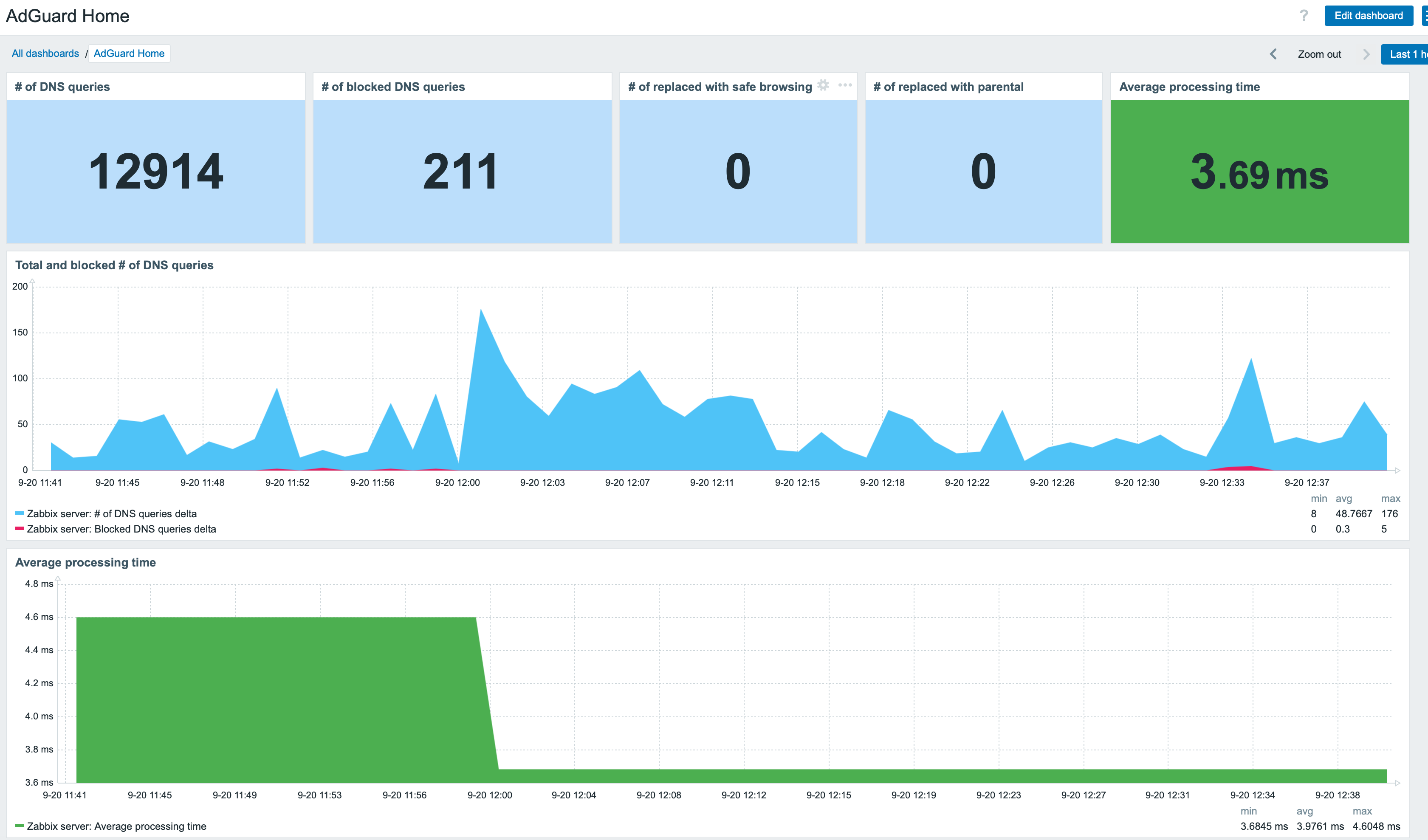
Dashboard

Communicate with the API

Communicating with AdGuard Home API is easy: pass it Authorisation: Basic XXXXXXXXXXXX header, where XXXXXXXXXX is just a Base64 hash of your AdGuard username and password. You can generate that Base64 snippet with for example

echo -n "myuser:mypassword" | base64

Next, in Zabbix, create a new HTTP Agent type item, and point it to your AdGuard Home instance.

Master item

Create some items

You'll get the info back as JSON, so next you can create some dependent items and start monitoring. I only added 

  • Total number of DNS requests
  • Blocked # of DNS requests
  • Redirects to safe search
  • Parental advisory stuff
  • Average request processing time

For the dependent items, you'll then just do some JSONPath processing.

Preprocessing

Add triggers

Next, I added few triggers to alert me if AdGuard starts to run slower than usual.

Triggers

Add service

Finally, I added AdGuard as a new business service, so I'll get an SLA for it.

And that's it! From now on I'll know more about how well my home router ad-blocker is working. (Well, it also has Skynet firewall which probably filters stuff before AdGuard Home, but that's another story....)

whatsuphome
zabbix
adguard
monitoring
  • Add new comment

Comments (1)

  • Allowed HTML tags: <a href hreflang> <em> <strong> <cite> <blockquote cite> <code> <ul type> <ol start type> <li> <dl> <dt> <dd> <h2 id> <h3 id> <h4 id> <h5 id> <h6 id>
  • Lines and paragraphs break automatically.
  • Web page addresses and email addresses turn into links automatically.

Enhance the post, but thanks

Mark (not verified)

2 years 10 months ago
Permalink
New

I find this topic is lacking context and more details about the AdGuard authentication and Zabbix item creation.
Despite that, thanks a lot for this information.
I was looking for a way to monitor my AdGuard Home but didn't know how to (didn't look for neither :D).

  • Reply
I used AdGuard Home's API with Zabbix HTTP Agent items to monitor DNS request counts, blocked queries, redirects, and average processing time. Basic auth headers authenticate the API calls, and dependent items parse the JSON response. Triggers alert on

Search

Who am I?

  • Janne Pikkarainen from Finland 🇫🇮
  • Began with computers in 1986 with C64
  • Doing IT for living since 1999
  • Principal Site Reliability Engineer at Forcepoint
  • A Zabbix Summit speaker every year since 2022
  • Walking, talking Zabbix commercial

Support my project

Buy me a coffee 

Footer menu

  • Contact

What's up, home? | Janne Pikkarainen | contact(at)whatsuphome.fi | 2022 - 2026

Developed and Designed by Janne Pikkarainen