
I just integrated my Zabbix with locally running generative AI in five minutes. You could do it, too. Here's how.
Install GPT4All
For my test, I'm using GPT4All, or its Python libraries. Install it with
pip install gpt4allNext, I took one of their example scripts and added very primitive command line argument handling. Here's the full Python script.
from gpt4all import GPT4All
import argparse
parser = argparse.ArgumentParser(description='Pass question to GPT4All')
parser.add_argument('-q', '--question')
args=parser.parse_args()
model = GPT4All('wizardlm-13b-v1.2.Q4_0.gguf')
system_template = 'A chat between a curious user and an artificial intelligence assistant.'
prompt_template = 'USER: {0}\nASSISTANT: '
with model.chat_session(system_template, prompt_template):
   response1 = model.generate(args.question)
   print(response1)
With this, you can run the script like python3 your_script_name.py --question "Tell me about Zabbix"
python3 ./zabbix_response_generator.py --question "Tell me about Zabbix"
1. Introduction to Zabbix:
Zabbix is an open-source monitoring software that allows you to monitor network devices, servers, applications, and cloud services in real time. It provides a comprehensive view of your IT infrastructure's health status, enabling you to detect issues before they become critical problems.
2. Key features of Zabbix:
* Real-time monitoring: Zabbix offers real-time monitoring capabilities that allow you to track the performance and availability of your systems continuously. It provides detailed insights into system resource usage, network traffic, application performance, and more.
* Customizable dashboards: You can create customized dashboards in Zabbix to visualize data from multiple sources in a single view. This feature helps you quickly identify issues across different parts of your infrastructure.
* Alerting and notifications: Zabbix allows you to set up alerts based on predefined conditions, such as high CPU usage
Add scripts to Zabbix context menus
Great, it worked, so we are almost done! The only remaining thing is to do now is to bond a loving marriage between Zabbix and the script. For that, you need to first decide, how to summon the script from Zabbix.
I decided to run it over ssh, as it's running on a laptop, not on my Raspberry Pi 4. To do that, I did go to Zabbix Alerts -> Scripts, added a new script and clicked the buttons to look like this. Note that as parameters to my script --question you can (and should) pass Zabbix macros, such as {EVENT.NAME}, {EVENT.AGE} and whatever you might need to get your reply.

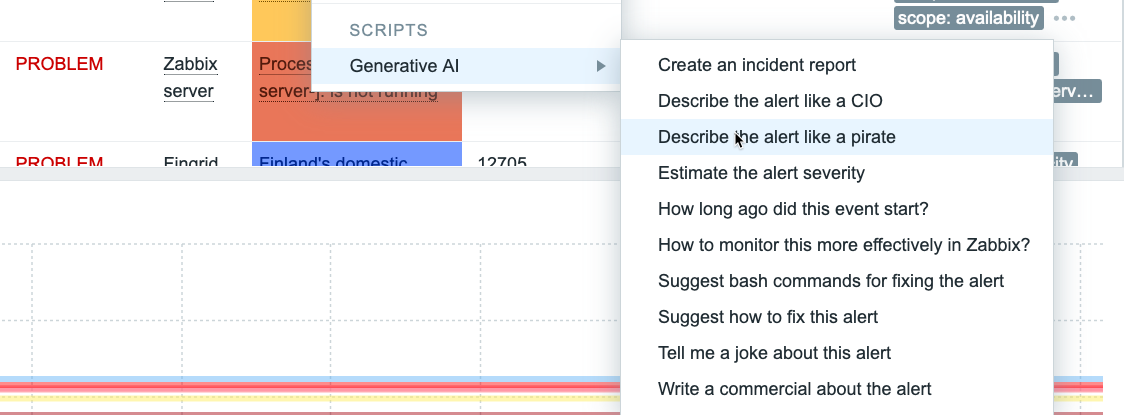
And it's all done! Or would be. I went a bit crazy and added few more questions.
What does it look like?
It's gorgeous! Now if I click on any alert on Zabbix alerts list, I get this.

... and if I choose any of the items, after a bit of waiting (MacBook Pro M1 generates the answers in 10-15 seconds) I get this..

... or this ...

... or this ...

You get the idea.
What's next?
Even though I have Zabbix 7.0beta1, this test was made in a more traditional way. Whenever I continue with the GenAI track, I'll move the functionality to a custom widget. Another cool idea would be to make the Python script to query the latest developments in my What's up, home? environment over the Zabbix API, and generate a morning newspaper or whatever in that way.
We'll see what I'll come up with next. Maybe I ask for more ideas from GPT4All itself...

Comments (4)
Zabbix Gen AI
Jules (not verified)
I am trying to do this but there are so many configurations issues
Tell me more
whatsuphome
What kind of config issues? :)
Error during script launch.
Dylan (not verified)
Hello,
I have installed GPT4 All, on a fixed PC on which I have installed Debian 12.
This PC has a Nvidia GTX 3050 graphics card.
When I run the script, I get this error:
Failed to load libllamamodel-mainline-cuda.so: dlopen: libcudart.so.12: cannot open shared object file: No such file or directory
Failed to load libllamamodel-mainline-cuda-avxonly.so: dlopen: libcudart.so.12: cannot open shared object file: No such file or directory
python3 -m venv gpt4all-cli
I don't have Nvidia GPU ..
whatsuphome
... but to me that error looks like that you don't have Nvidia CUDA packages installed. Would that be the cause in reality, or would libllama be looking for different version of that, I don't know. But I hope this helps you to find the actual reason :)