
Skip to header Skip to main navigation Skip to main content Skip to footer

Search form

Site branding

Home
What's up, home?

Main navigation

  • Home
  • Story mode
  • About
  • Features
  • Hardware list
  • Videos
  • GitHub (opens in new tab)
  • Daily AI generated stories (opens in new tab)

Part 38: Yes I have NetFlow at home, but what is it good for?

Breadcrumbs

Breadcrumb

  • Home
  • Part 38: Yes I have NetFlow at home, but what is it good for?

Main page content

By whatsuphome | 5:38 AM EET, Mon February 20, 2023

TL;DR

I set up NetFlow monitoring at home to track where my IoT devices are communicating, using Grafana's Sankey panel and ElastiFlow dashboards for visualization. Our Samsung Smart TV was sending traffic to locations worldwide even when turned off. NetFlow
Sankey diagram

In part 36 of this series, I did let you know I have NetFlow monitoring at home. But for what is it good for, other than geek factor? By day, I am a Lead Site Reliability Engineer in a global cyber security company. By night, I monitor my home with Zabbix & Grafana and do some weird experiments with them. Welcome to my blog about the project.

NetFlow can be really useful to find out where your IoT devices are talking to. In an ancient post of this blog series I told you how according to ping test our Samsung Smart TV is responding to ping for short periods of time even when we are not using the TV. Now, with NetFlow, we can see what's going on under the hood. I'll let our TV to be the star of the show for showing how NetFlow can help you.

NetFlow data visualised with Grafana

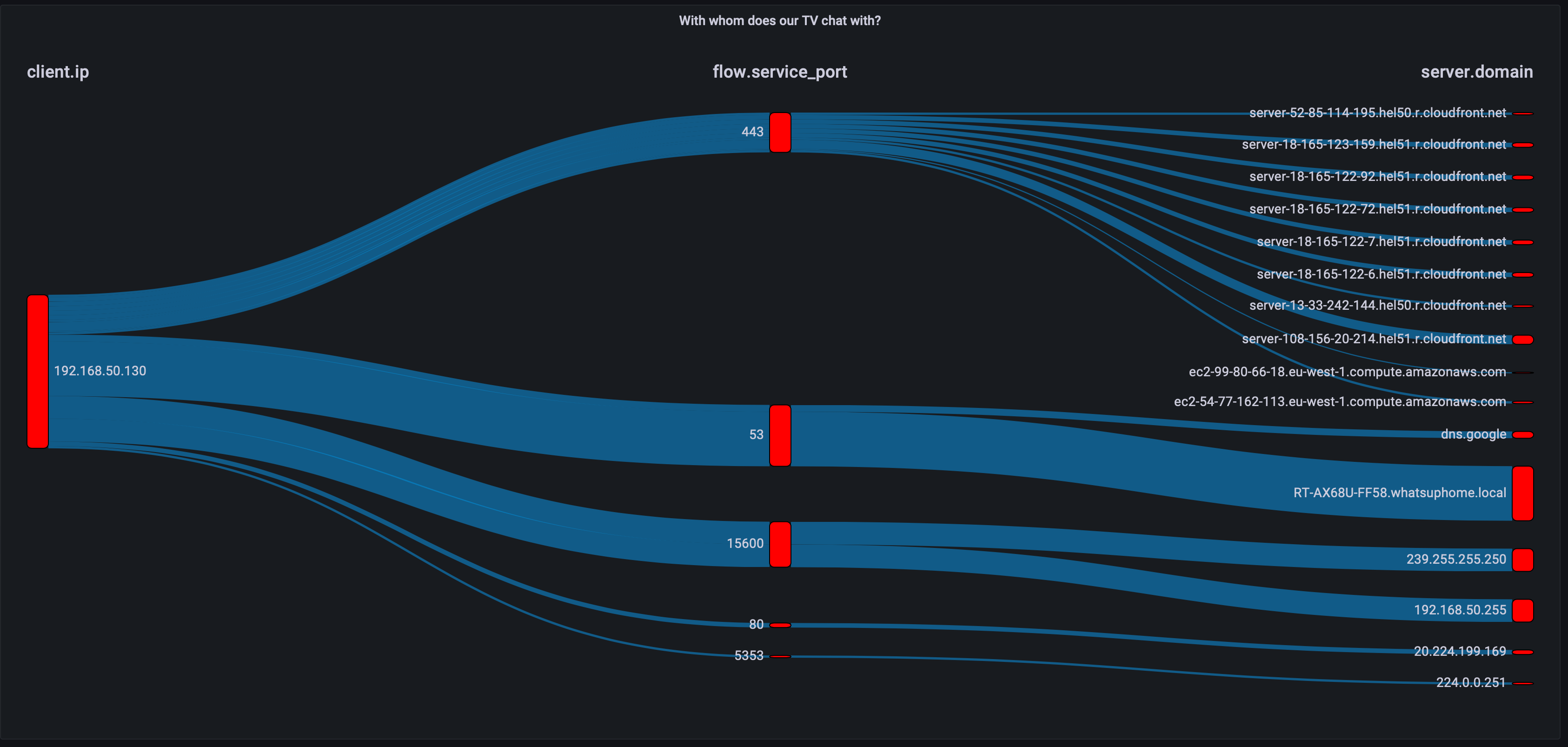
Sankey Panel for Grafana can be incredibly cool with all kinds of flow data. Here's an example from last night. Our TV was not on as we were sleeping, yet still the NetFlow data looks like this.

Sankey panel
Checking for updates, Sammy? Or just wanted to call your mom?
Sankey diagram of destination countries
To which countries you wanted to call, Sammy?
Sankey diagram of destination cities
How about to which cities?
Sankey diagram of ASNs
And over which pipes do you want to travel today?

And here is the world map of geographical locations it was connecting to.

World map
Here's a virtual vacation plan to the cloudy destinations that's AWS, for the most part anyway.

The same in ElastiFlow/Kibana

ElastiFlow is basically just a bunch of Logstash rules and preconfigured Kibana dashboards.  So, here's a collection of images showing some examples how this same data can be observed through it.

ElastiFlow overview
Here's the ElastiFlow overview page.
ElastiFlow top-N
Top hosts where our TV was connecting to.
ElastiFlow flows view
And here are the flows. When using interactively, the above flow diagram is much easier to read as it reacts to mouse pointer.
Kibana discover
If you use Kibana's Discover or just browse the available stuff in Grafana's Elasticsearch query editor, you'll find out that there's so many different details to investigate. This is just a small snippet.

In a nutshell: if you need to learn about how chatty your (IoT) devices are, NetFlow is an excellent option.

Next time I'll be back to Zabbix with something Completely Else.

I have been working at Forcepoint since 2014 and am always eager to find out what my devices are doing.

whatsuphome
grafana
elasticsearch
elk
elastiflow
diagrams
tv
  • Add new comment

Comments (1)

  • Allowed HTML tags: <a href hreflang> <em> <strong> <cite> <blockquote cite> <code> <ul type> <ol start type> <li> <dl> <dt> <dd> <h2 id> <h3 id> <h4 id> <h5 id> <h6 id>
  • Lines and paragraphs break automatically.
  • Web page addresses and email addresses turn into links automatically.

NetFlow Configuration

Tasaddaq (not verified)

3 years 7 months ago
Permalink
New

Hi any one tell me how to configure NetFlow on Zabbix
Any Solution

  • Reply
I set up NetFlow monitoring at home to track where my IoT devices are communicating, using Grafana's Sankey panel and ElastiFlow dashboards for visualization. Our Samsung Smart TV was sending traffic to locations worldwide even when turned off. NetFlow

Search

Who am I?

  • Janne Pikkarainen from Finland 🇫🇮
  • Began with computers in 1986 with C64
  • Doing IT for living since 1999
  • Principal Site Reliability Engineer at Forcepoint
  • A Zabbix Summit speaker every year since 2022
  • Walking, talking Zabbix commercial

Support my project

Buy me a coffee 

Footer menu

  • Contact

What's up, home? | Janne Pikkarainen | contact(at)whatsuphome.fi | 2022 - 2026

Developed and Designed by Janne Pikkarainen