Can you integrate Zabbix with Siri? Of course you can! By day, I am a monitoring tech lead in a global cyber security company. By night, I monitor my home with Zabbix & Grafana and do some weird experiments with them. Welcome to my weekly blog about the home project.
I have lost the count exactly when, but couple of major iOS/macOS versions ago Apple's Siri gained the Shortcuts application. It allows you to automate all kinds of stuff and do some drag-and-drop 'programming'.
What do I use it for? You guessed it right -- I integrate Shortcuts with Zabbix API.
Setting up the Zabbix side
For my home Zabbix environment, I do not have any complex access rights set. So, setting up the API token for Shortcuts to consume was almost a one-click operation -- in Zabbix, I went to User settings --> API tokens --> Create API token and let it do its stuff.

Creating a new shortcut
Now that I have the API token in place, next we need to create the shortcut. That's not too much work though -- run the Shortcuts application and create a new shortcut. What the shortcut below does is
- calls Zabbix API and requests our fridge temperature
- parses the value and appends "degrees Celsius" to it
- returns the value

Yes, that's all of it. Drag 'n drop couple of elements and assign some values. Done.
Time to get Sirious
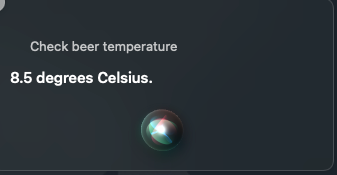
Ok, so we have our shortcut in place. What happens if I now ask Siri to check beer temperature? This happens.

The result is actually our refrigerator temperature, the beer thing was just to make this more interesting. But, as you can see, integrating Zabbix with Siri -- or vice versa -- is not too hard.
Any real world use cases for this, other than the geek factor? I don't know. Might be handy to request the latest alerts or similar from Siri if I'm driving my car and I get to hear that something's wrong at work.
I have been working at Forcepoint since 2014 and I confess I actually use Siri for some basic work stuff, too.
